Trip type
What kind of run was it?
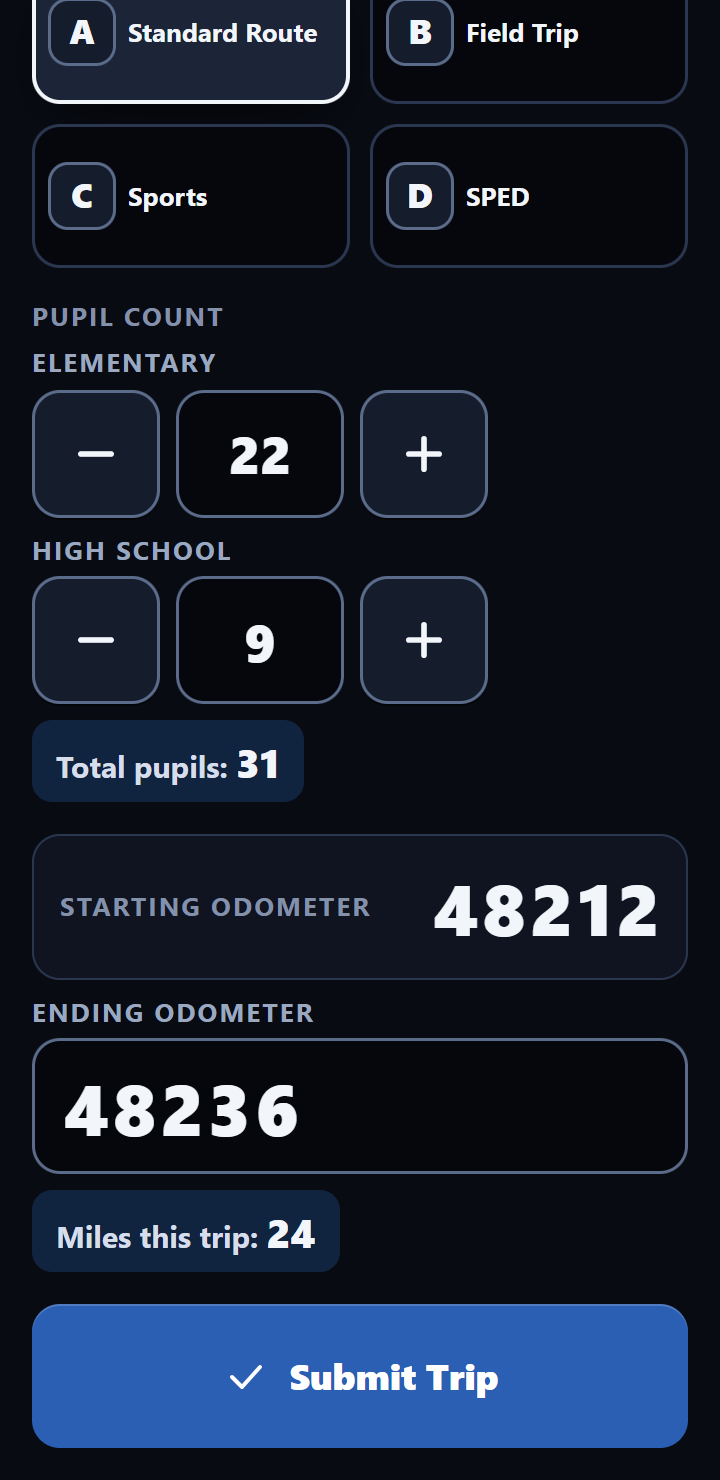
One tap on a tile. Out of the box they're A Standard Route, B Field Trip, C Sports and D SPED. Rename them to your garage's own words, or switch off the ones you don't use.
Add-on for One-Touch DVIR
The Mileage & Pupil Tracker puts the trip sheet on the same app your drivers use for the pre-trip. After each route or trip they log what kind of run it was, how many students rode and the ending odometer. On the 1st, your business office gets the month, bus by bus.
Shown with made-up demo data
A to D out of the box: Standard Route, Field Trip, Sports and SPED. Rename them to fit your garage.
of every month: a mileage and pupil-count report for every bus, in its own email to your business office.
Bus Mileage and Bus Ridership, filled in every night and shared view-only with your business office.
Pupil counts only. The tracker never asks for a student's name.
What a driver logs
When a route or trip is done, the driver logs it on the same app they use for the pre-trip. Four things, most of them a tap or two, then Submit Trip.
Trip type
One tap on a tile. Out of the box they're A Standard Route, B Field Trip, C Sports and D SPED. Rename them to your garage's own words, or switch off the ones you don't use.
Pupils
Elementary and High School counts, with big plus and minus buttons. The total adds itself. A head count is all it asks for: no names, no rosters.
Odometer
The starting reading carries over from the bus's last trip (the phone picks it up from the office when it has signal), so the driver types only the ending odometer. If that starting number is ever wrong, the driver doesn't fix it on the phone. Your supervisor fixes it on the Trips page in the mechanic app.
Times
Your call, set up for your garage. You can skip times on daily routes and ask for them only on field trips and sports trips. Those trips can also ask for a short description, like where the team played.
The “Does this look right?” check
Type 48,436 instead of 48,236, and a 24-mile route turns into 224 miles on the month-end report. So once a bus has a few trips on the books, the phone knows about how far it usually goes on each route, morning and afternoon, and speaks up when a trip is way off.
The check, as the driver sees it
Month-end
Separate from your inspection report, your business office gets its own email on the 1st: a PDF for every bus with the month's miles and rider counts. Nobody builds a spreadsheet. Nobody chases drivers for odometer slips.
Living workbooks
Two Google Sheets, Bus Mileage and Bus Ridership, fill themselves in every night. Each has a tab for every month, August through June. Nothing to import, no button to press.
Sample data. The highlighted row filled itself in overnight.
Corrections
Every evening the office checks the day's trips. If something needs a look, your supervisor gets one email and fixes it from the mechanic app. On a clean day, no email at all.
The evening trip check
It looks for a bus that was inspected but has no trip logged, an odometer that doesn't pick up where the last trip ended, and a route with no riders. Quiet days stay quiet.
The Trips page, in the mechanic app
Each item gets Looks right, Fix or Add missing trip. A fix runs through the same checks as the driver's phone, and it's logged with the name of whoever made it.
Plainly
Drivers enter how many students rode, by level. The tracker never asks for a student's name.
SPED trips fill the Sped column in the ridership book, and Special Needs miles are split out on the monthly report.
The driver's PIN signs inspections, not trips. A trip log is a record of miles and riders, and it's kept that way.
A trip carries no location, and nothing follows the bus. The miles come from the odometer.
Pricing
The Mileage & Pupil Tracker is an add-on to One-Touch DVIR. It stays off unless your garage wants it, and the inspection app works the same either way.
Mileage & Pupil Tracker
Added to One-Touch DVIR at $20 per driver per month.
Example: a 12-driver garage
Tracker questions
No. It's an add-on, and it stays off unless your garage wants it. Pre-trips, post-trips, defect alerts and the monthly inspection report work exactly the same with or without it.
With the rest of your garage's records, in its own tabs next to your inspections. Your district owns every record — it's in the agreement. Records are kept on Google, in an account we manage, and you can have a complete copy whenever you ask.
Your business office sees only the two view-only workbooks, which hold miles and rider counts and nothing else. More on security and data.
Not much. The trip type is one tap, the pupil counts use plus and minus buttons that total themselves, and the starting odometer carries over from the bus's last trip. The only reading a driver types is the ending odometer.
Yes. The four slots, A through D, can carry your garage's own names, and any you don't use can be switched off. D might be “SPED” for you, or “Special Needs”. You also choose which trip types ask for a short description, like a field trip's destination. We set them up with you, and change them when you ask.
No. A trip carries no location. The miles come from the odometer readings the driver enters. The only location One-Touch DVIR saves is an approximate one, attached to an inspection when the driver sends it. The app notes it only while it's open on screen, and never follows the bus.
Tell us how many buses and drivers you run, and how mileage and ridership get counted today. One call, one real answer.
Serving Washington school bus garages. Calls returned the same day.