One-Touch DVIR
Call Bob

Compliance

Built to the rulebook, and honest about it.

One-Touch DVIR is built to FMCSA's electronic DVIR rules and helps you document the checks in Washington's pre-trip and post-trip rule. This page names every rule in full, quotes what it actually says, is plain about what it doesn't say, and shows you the exact agreement your drivers sign.

3months

the federal keep-it floor, where that rule applies. One-Touch keeps every inspection for as long as you subscribe.

2026

FMCSA's eDVIR final rule took effect March 23, putting electronic DVIRs in writing.

v1.2

of the Driver Electronic Signature Agreement, published on this page word for word.

1tap

for a clean inspection, signed with the driver's PIN on file.

Please read this first. FMCSA does not certify or approve DVIR software. One-Touch DVIR records the inspections your drivers perform; your district remains responsible for its own compliance. Nothing on this site is legal advice. For your district's obligations, ask your district's counsel. Rule text quoted here was checked against eCFR, the Federal Register, the U.S. Code (Cornell LII) and the Washington Legislature's website in October 2026.

The federal chain

Three sections and one final rule. Named together, every time.

Here's what each one says, in its own words, and what One-Touch does about it. Open a rule to read it.

49 CFR § 390.32Electronic documents and signaturesFMCSA documents a carrier must keep may be signed electronically, with proof the signer agreed to electronic records.

Anyone required to sign an FMCSA document may sign electronically, “using any available technology,” so long as the record is accurate, can be kept and reproduced, and includes proof the signer consented to electronic records.

In the federal rules since 2018 83 FR 16226
What One-Touch does

Before their first inspection, each driver reads the Driver Electronic Signature Agreement and signs it with the PIN their supervisor assigned. The office records each acceptance it receives, with the agreement's version number.

Worth knowing

The rule doesn't name PINs or any other technology, and it doesn't set up any approval for DVIR apps. It leaves the method open, as long as the record holds up.

“An electronic signature may be made using any available technology that otherwise satisfies FMCSA's requirements.”

§ 390.32(c)(2)

Electronic documents fall short “if they do not include proof of consent to use electronically generated records or documents, as required by 15 U.S.C. 7001(c).”

§ 390.32(d)
Read § 390.32 on eCFR
49 CFR § 396.11Driver vehicle inspection reportsWhat a report covers, the driver's signature, the repair certification, and three months' keeping.

Lists the parts a report covers, requires the driver to sign, requires the carrier to certify repairs, and requires keeping reports for three months. Since 2026 it says the report “may be created and maintained in electronic format, in accordance with 49 CFR 390.32.”

What a report covers, at a minimum

Service brakes Parking brake Steering Lighting and reflectors Tires Horn Wipers Rear-vision mirrors Coupling devices Wheels and rims Emergency equipment

“The driver must sign the report.”

§ 396.11(a)(2)(ii)

“Drivers are not required to prepare a report if no defect or deficiency is discovered by or reported to the driver.”

§ 396.11(a)(2)(i)
What One-Touch does

Every report names the bus and the driver, lists any defects with the driver's notes, and is signed with the driver's PIN. The mechanic then sets each defect's repair status, with a date and a note, on that defect's record.

Worth knowing

The federal rule only asks for a report when there's a defect. One-Touch also keeps a signed record of every clean inspection, so a quiet month still shows up on paper.

Read § 396.11 on eCFR
49 CFR § 396.13Driver inspection, before drivingThe driver makes sure the bus is safe, and reviews the last report, before driving.

Before driving, the driver must be satisfied the vehicle is safe, review the last report if it listed a defect, and sign that they reviewed it and that repairs were certified. It also permits electronic format under § 390.32.

What One-Touch does

Before a driver signs, the app shows every open defect on that bus and where the repair stands, when the phone has signal. If the mechanic has marked the bus Out of Service, the driver's phone shows a full-screen “Do not operate this bus” warning once it hears that from the office, and it remembers, so the warning still shows with no signal.

Worth knowing

One-Touch shows the driver the open defects. It does not collect a separate signature for the driver's review of the last report and its repair.

“Before driving a motor vehicle, the driver shall: (a) Be satisfied that the motor vehicle is in safe operating condition …”

§ 396.13(a)

“The reports required by this section may be created and maintained in electronic format, in accordance with 49 CFR 390.32.”

§ 396.13(d)
Read § 396.13 on eCFR
91 FR 7893FMCSA's electronic DVIR final ruleEffective March 23, 2026: a DVIR may be electronic, now in so many words.

Electronic Driver Vehicle Inspection Reports, 91 FR 7893, published February 19, 2026, effective March 23, 2026 (Docket FMCSA-2025-0115, RIN 2126-AC89). It made the electronic option explicit in §§ 396.11 and 396.13.

Published Feb 19, 2026 Effective March 23, 2026
What One-Touch does

One-Touch creates, signs and keeps each report electronically, under § 390.32, the section the final rule points back to.

“The DVIR may already be completed electronically, however the explicit language in this rule will make this clear.”

FMCSA, summary of the final rule
Worth knowing

The rule put in writing what § 390.32 already allowed. It didn't make electronic reports mandatory: paper DVIRs are still legal.

Read the final rule in the Federal Register

Underneath it all

The signature law under the DVIR rules.

Federal and Washington law both say an electronic signature can't be brushed aside just because it's electronic.

15 U.S.C. § 7001The federal ESIGN ActA signature or record can't be refused just because it's electronic.

A signature, contract or record “may not be denied legal effect, validity, or enforceability solely because it is in electronic form.”

15 U.S.C. § 7001(a)

An electronic signature is “an electronic sound, symbol, or process, attached to or logically associated with a contract or other record and executed or adopted by a person with the intent to sign the record.”

15 U.S.C. § 7006(5)
Read 15 U.S.C. § 7001
Chapter 1.80 RCWWashington's Uniform Electronic Transactions ActWhere a law requires a signature, an electronic signature satisfies it.

“If a law requires a signature, an electronic signature satisfies the law.”

RCW 1.80.060(4)

“Each governmental agency of this state shall determine whether, and the extent to which, a governmental agency will create and retain electronic records …”

RCW 1.80.160

For a public district, choosing electronic inspection records is the district's call to make.

Read chapter 1.80 RCW

Washington school buses

Washington's own rules come first. They say what to check.

OSPI's operating rules apply to every school bus a district owns, and every bus run for a district under contract (WAC 392-145-001). Here's what they ask of your drivers, and where the federal rules come in.

WAC 392-145-041

Pre-trip and post-trip checks

OSPI's rule lists what a school bus driver checks before every trip, and the child check at the end of every run.

What One-Touch does

The rule lists the checks. It doesn't require a written or electronic record of them. One-Touch gives you a signed, time-stamped record of each inspection anyway, and the driver agreement names this rule. The driver's main screen lists the 23 items each tap certifies, from brakes to the first-aid kit and clear aisles. The app doesn't step the driver through each check, and the end-of-route child check isn't on that list.

Worth knowing

A separate OSPI rule, WAC 392-141-330, does ask for a written record. Districts “shall require drivers to maintain a daily route log that includes the school bus driver's name, bus number, route number, destinations and student counts by destination, pretrip and posttrip verification, with the date and school bus driver's signature.” Daily route logs “are required to be completed at least once each week,” and “Electronic data collection systems or files may be used for any of this information.” One-Touch's inspection record is not that route log: it doesn't carry route numbers, destinations or student counts.

Before any trip, the driver

  • Checks the fuel
  • Cleans the mirrors and windows
  • Keeps aisles and exits clear, and tools stowed
  • Makes “certain that all brakes, lights, stop signs, warning signal lamps, and other safety devices are working properly”
  • Confirms the first-aid kit, three reflective triangles, body-fluid clean-up kit and fire extinguisher
  • Checks the emergency exit latch, lock and warning

After each trip or route segment

  • “thoroughly check the school bus to ensure that no students are left on the school bus”
WAC 392-143-035

Washington State Patrol inspections

“All school buses shall be inspected annually by the Washington state patrol.”

WAC 392-143-035

On top of the annual inspection, WSP makes a second, unannounced check of at least 25% of each fleet every year.

With One-Touch, every defect your drivers reported and what the shop did about it is in your records and your monthly reports, bus by bus.

Read WAC 392-143-035
WAC 446-65-010

Washington adopts the federal rules

The Washington State Patrol adopts the federal motor carrier rules, including Part 390 and Part 396, “as they exist on April 25, 2026.” The current version took effect October 9, 2026 (WSR 26-19-024).

What that means

Washington's copy includes § 390.32, which has allowed electronic records and signatures since 2018, and now the 2026 eDVIR amendment to §§ 396.11 and 396.13 too.

Read WAC 446-65-010

The honest answer

Does the federal DVIR rule apply to you?

It depends on who runs your buses and which trips they run. The federal rules include an exemption, 49 CFR 390.3T(f) (the § 390.3 text in force today), that generally covers home-to-school bus runs and transportation run by a state or local government. A private contractor may still be covered on some trips.

“… the rules in this subchapter do not apply to— (1) All school bus operations as defined in § 390.5T … (2) Transportation performed by the Federal government, a State, or any political subdivision of a State …”

49 CFR 390.3T(f)

A school bus operation is “the use of a school bus to transport only school children and/or school personnel from home to school and from school to home.”

49 CFR 390.5T

One-Touch is built to the federal rule either way. The one step it doesn't record is a separate driver signature on the review of a repaired defect (§ 396.13(c)).

  • Why keep a signed record anyway? When a WSP inspector, your board or a parent asks whether a bus was checked that morning, you can show who checked it, when, what they found and what the shop did about it.
  • Paper is still legal. FMCSA kept paper DVIRs in the 2026 rule. Electronic is faster, and now allowed in so many words.
  • Clean inspections count too. The federal rule only requires a report when there's a defect. One-Touch also keeps a signed record of every clean inspection.
  • Washington's rules apply regardless. WAC 392-145-041 covers district and contracted buses alike.
  • Your counsel has the last word. Which rules bind your operation is a question for your district's attorney. We're happy to send them this page.

How signing actually works

One PIN. One agreement. Then one tap.

No password to remember and no PIN to retype at 5:30 in the morning. Here's exactly what a driver does, and what gets recorded.

  1. The supervisor assigns a PIN

    Four digits, set by the supervisor. Drivers never make their own.

  2. The driver signs the agreement

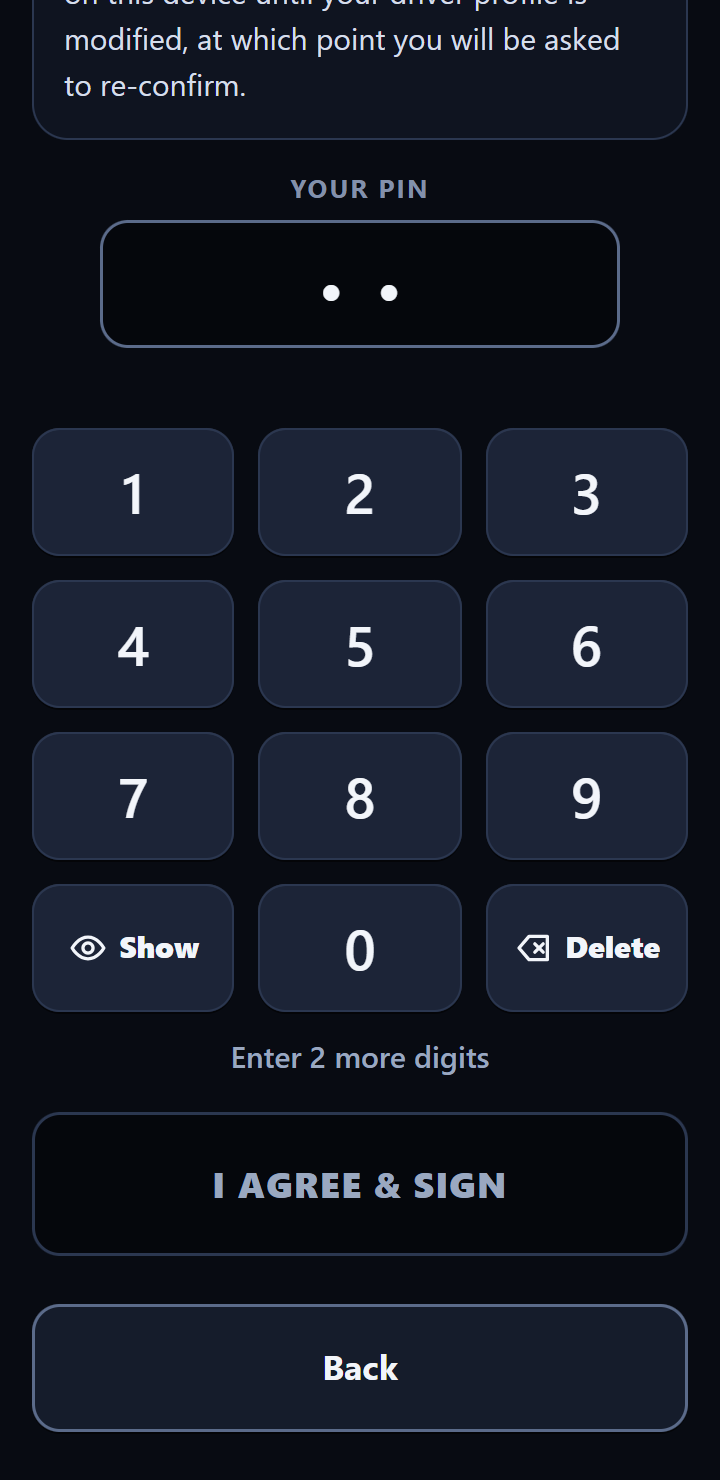
    At first sign-on, the driver reads the Driver Electronic Signature Agreement, enters the PIN and taps I Agree & Sign. The office records each acceptance it receives, with the time, the bus and the agreement's version.

  3. Each inspection is one tap

    From then on, a clean inspection is one tap on No New Defects Found, signed with the PIN on file. The line right above the button says so: “Your tap is your signature · PIN on file.” A defect report is signed the same way.

  4. New bus, sign again

    When a driver changes bus, the app asks for the PIN again to re-confirm the agreement.

Trips logged with the Mileage & Pupil Tracker are mileage and ridership records, not inspections. They aren't signed and carry no location.

Shown with made-up demo data

What gets recorded

What each record holds.

Every inspection lands in your district's inspection log as one record. This is everything in it.

  • The office's clock time, stamped when the report arrives, so the record doesn't rest on the phone's clock.
  • The phone's own clock time when the driver tapped, and how many seconds passed between the certification list showing and the tap.
  • The driver, the bus and the district, and whether it was a pre-trip or a post-trip.
  • The result: No New Defects Found, or the defects the driver picked, with their notes.
  • An approximate location the phone reports, with its accuracy estimate, when one is available. It's never required, and never tracked between inspections.
  • The phone's browser description, the short line a browser sends about itself (such as iPhone and Safari). Not a device ID.
  • The driver's signature: the PIN on file.

The app only ever adds inspection records. It never edits or deletes one.

No New Defects Found

Sample record · one clean pre-trip

Office timeFri, Sep 25, 2026 · 5:42:07 AM
Phone time5:42:05 AM
DriverCasey Lund
Bus22
InspectionPre-trip
ResultNo New Defects Found
DefectsNone
NotesNone
Location47.10, −119.20 · about ±30 m
BrowseriPhone · Safari
SignatureDriver's PIN on file

Sample data, shown in plain words. Location is best-effort; if the phone can't get one, the inspection still goes through and that line is blank.

Repairs and review

The write-up starts the record. The shop finishes it.

From the driver's report to the mechanic's fix and back to the next driver, every step stays with the defect.

  • Open defects, before signing

    When the phone has signal, the app shows every open defect on that bus before the driver signs, and where each repair stands, so drivers report what's new instead of the same problem twice.

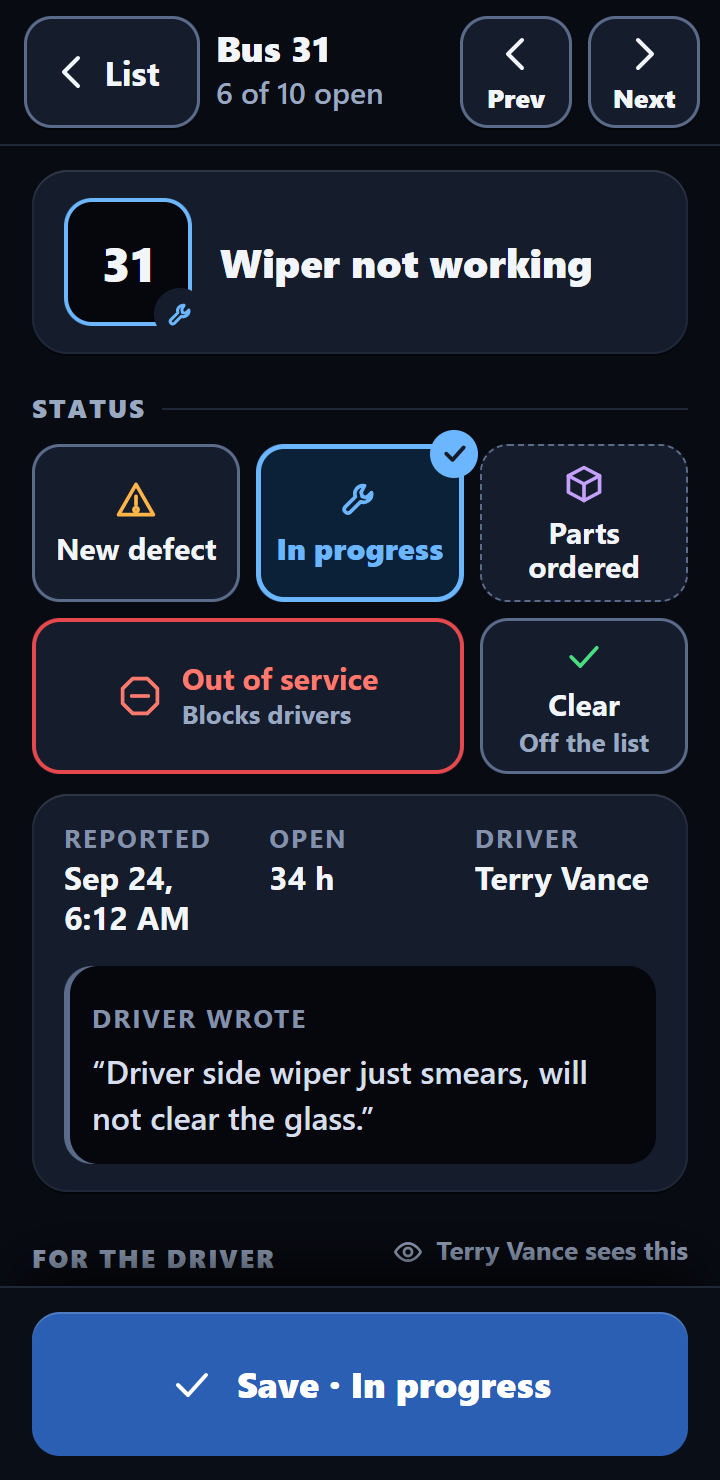
  • Five repair statuses

    The mechanic moves each defect along, with an optional message for the driver and an action date.

    New In progress Parts ordered Out of service Clear
  • The driver's “Got It”

    When the mechanic clears a repair and leaves the driver a message, it reaches the driver's phone when it has signal and stays on screen until they tap Got It. A message on a defect that's still open, or on the Out of Service screen, has a Got It too. That tap is recorded. If the mechanic changes the message, the driver is asked again.

  • Out of Service

    When the mechanic pulls a bus, the driver's phone shows a full-screen “Do not operate this bus” warning when it checks in with the office. The phone needs signal to get the news; after that it remembers, even in a yard with no signal. A phone that has had no signal since before the bus was pulled can't know.

The Got It tap is an acknowledgment, not a signature. One-Touch doesn't collect a separate driver signature on the repair.

When someone asks

What you hand an auditor.

When someone asks to see your inspection records, this is the stack.

  • The monthly report

    One combined PDF on the 1st: every bus's inspections, defects and repairs for the month. Per-bus PDFs are archived to Drive, and any month can be run again on request.

  • The inspection log

    Every inspection, signed and stamped with the office's time. Share a copy with the PIN column removed; the monthly PDF already leaves PINs out.

  • Defect and repair history

    Each defect with its status, the mechanic's notes and dates, and the driver's Got It on any message.

  • Signature agreement records

    Each acceptance or re-confirmation of the Driver Electronic Signature Agreement the office received: who, when, on which bus, and the app's agreement version at the time.

Not the PINs. The inspection log stores each driver's PIN with every record, so share a copy with that column removed. A driver's PIN is their signature: an auditor needs the name, not the PIN.

Keeping records

How long to keep them, and who decides.

Your district owns every record. It's in the agreement. The keeping rules are yours too, so here they are in one place.

3months

Where the federal rule applies

§ 396.11(a)(4): keep the report, the certification of repairs and the certification of the driver's review “for three months from the date the written report was prepared.”

Washington may say longer

Public districts follow the State Archives' records retention schedule for public schools, under chapter 40.14 RCW. Your records officer decides how long.

School district records

Kept while you subscribe

The app never deletes an inspection, and we don't delete records while you're a customer. A complete copy is yours whenever you ask. The agreement makes your district the official keeper, so file the monthly PDFs or a copy with your own records.

If you ever leave

You have 30 days after the agreement ends to take a complete copy, at no charge. We delete your records from the service within 60 days of the end date (sooner if you confirm you have your copy), and backups within 90.

Records are kept on Google, in an account we manage. How your records are kept and protected.

The words your drivers sign

The driver agreement, word for word.

This is the Driver Electronic Signature Agreement exactly as a driver sees it at first sign-on, before their first inspection. You should know what your drivers are agreeing to, so here it is.

Version 1.2 Effective May 31, 2026 Signed with the driver's PIN
Driver Electronic Signature AgreementVersion 1.2 · effective May 31, 2026 · shown at first sign-on
The re-confirm screen, on a bus changeVersion 1.2 · shown when a driver changes bus

About this version

  • Version 1.2 added the approximate-location notice. What a driver certifies did not change from version 1.1.
  • It rolled out as a notice. New drivers see the full version 1.2 text at first sign-on. Drivers who signed version 1.1 were not asked to sign again, and the short re-confirm screen on a bus change does not repeat the full text. The line “Approximate location is recorded when you submit.” is on every driver's main screen, under the items they attest to.
  • Each acceptance the office receives is recorded with the app's agreement version at that moment.
  • Two lines in version 1.2 go further than the app does today: there's no place in the app to change an email or phone number, and paper or PDF copies of records come from the supervisor, not from the phone.

Got a compliance question? Ask the person who built it.

Send Bob the citation and the question. You'll get an answer from the person who wrote the app, not a support ticket, usually within a business day.

Serving Washington school bus garages. Calls returned the same day.