One bar of signal, or none
The inspection saves on the phone and sends itself once there's signal and the app is open. The same record, never counted twice.
For rural and midsize school bus garages
One-Touch DVIR puts the pre-trip and post-trip on your drivers' phones. A clean bus takes one tap, signed with the driver's PIN on file. A defect texts and emails your mechanic and supervisor within seconds of being sent. And on the 1st of every month, your inspection report is already in your inbox.
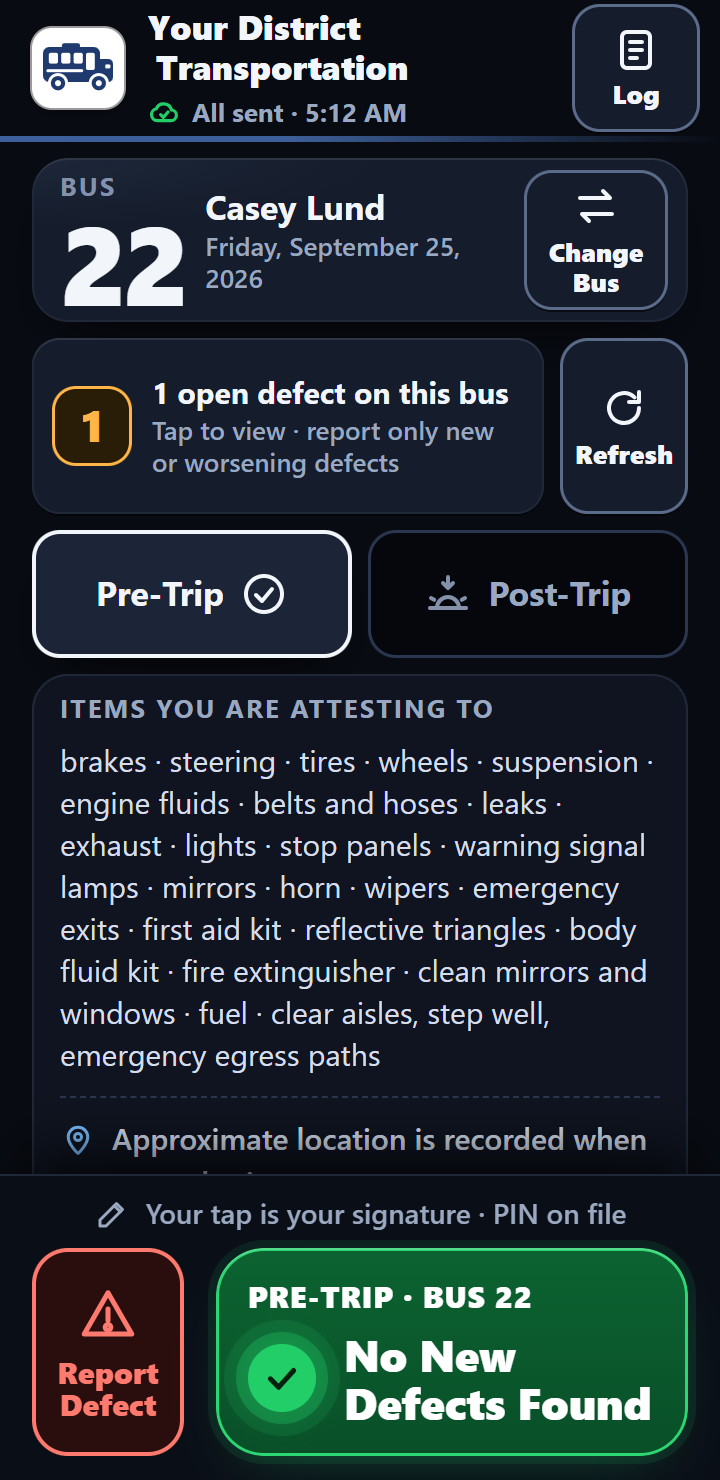
Shown with made-up demo data
for a clean inspection, signed with the driver's PIN on file.
hardware required. Drivers can use the phone they already carry. Need a tablet for one driver? $8 a month; ask Bob for the terms.
of every month: every bus's inspections, defects and repairs arrive in one printable PDF.
the driver certifies with that one tap, each one listed on the screen.
“Drivers picked it up on day one — adoption has been the easiest part.”
Why garages switch
A small garage doesn't need a fleet-tracking system. It needs something a driver with cold hands can use in the dark, that works when the yard has one bar of signal, and that the one mechanic actually sees.
The inspection saves on the phone and sends itself once there's signal and the app is open. The same record, never counted twice.
Big buttons, easy to hit with cold hands or touchscreen gloves. A dim night screen that won't blind a driver in a dark yard, and a crisp day screen for snow glare.
No app store and no password. A four-digit PIN from the supervisor and one green button. At Okanogan, drivers picked it up on day one.
Every defect reaches your mechanic and supervisor within seconds: which bus and what's wrong by text, plus the driver's own note and a map link by email.
Nobody builds a monthly report. It arrives on the 1st as one PDF with every bus in it, ready to print and file.
Nothing mounted in the bus, and no special hardware required. One price per driver, and your buses, mechanics and supervisors are free.
How it works
Your driver, your mechanic and your supervisor each see only what they need, and every step lands in the same record.
The driver
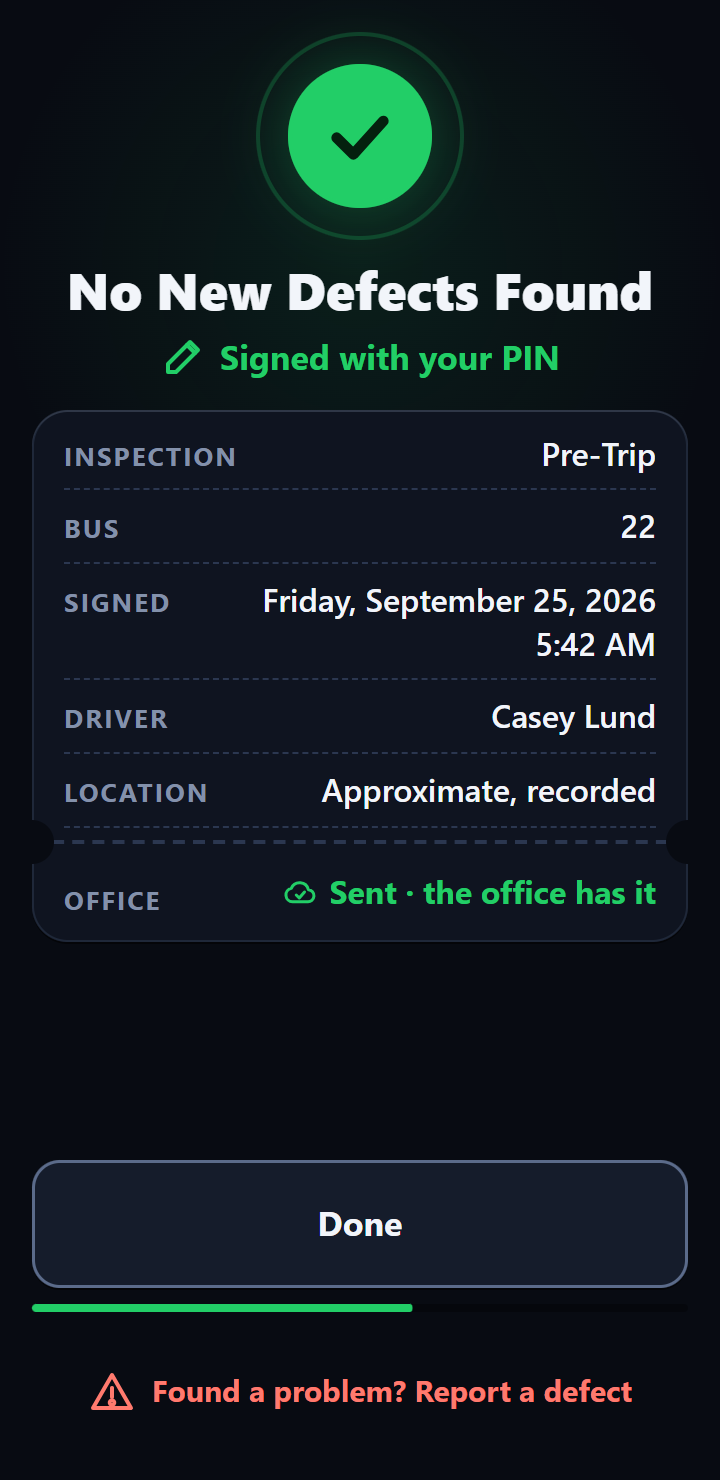
The driver checks the bus like always, then taps No New Defects Found. The inspection is signed with the PIN on file and sent to the office with the time and, if the phone has one, an approximate location.
The mechanic
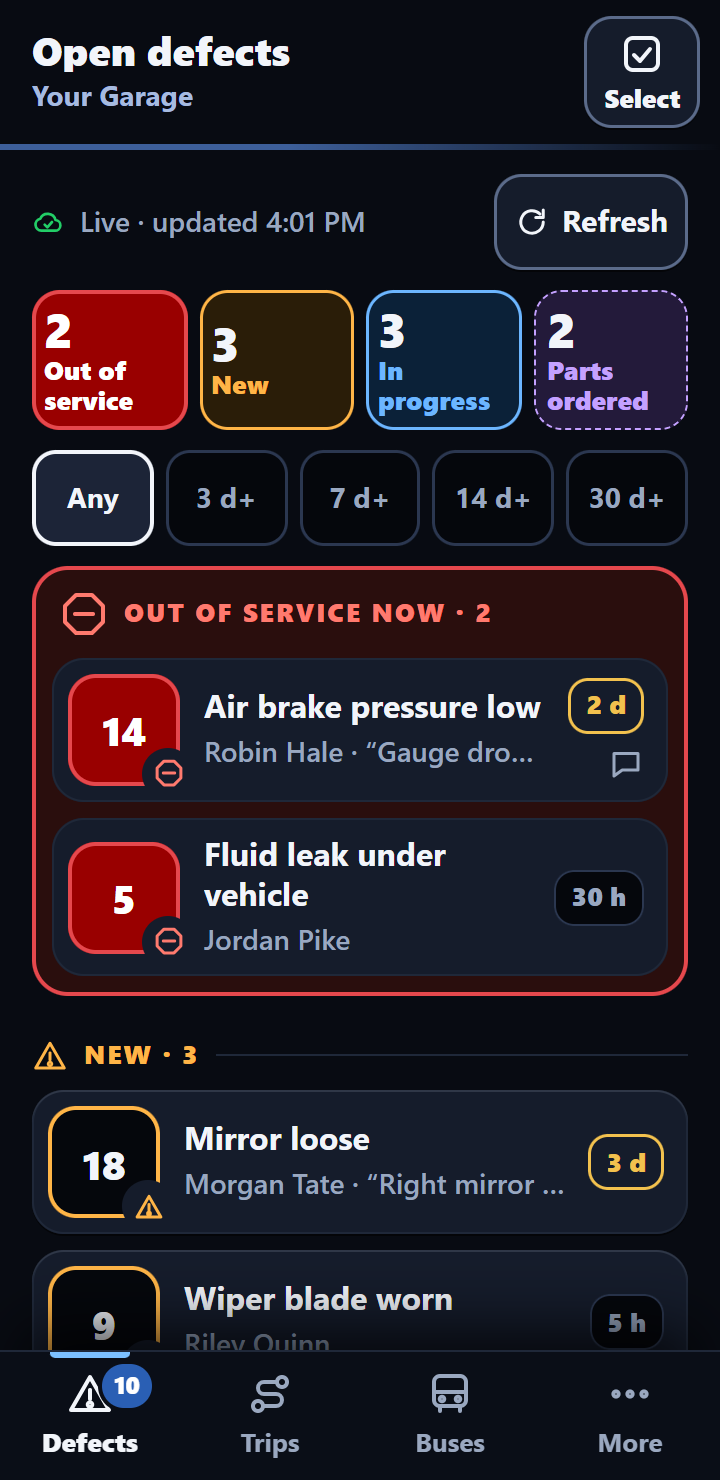
Found a problem? The driver picks it from a list, adds a note and sends it. Your mechanic gets a text and an email within seconds (so does your supervisor), then tracks the repair: New, In Progress, Parts Ordered, Out of Service, Clear.
The supervisor
On the 1st, your supervisor gets one PDF: every bus's inspections, defects and repairs for the month. Print it, file it, done. Any month is ready again on request.
Email Bob for a sample monthly reportOut of Service
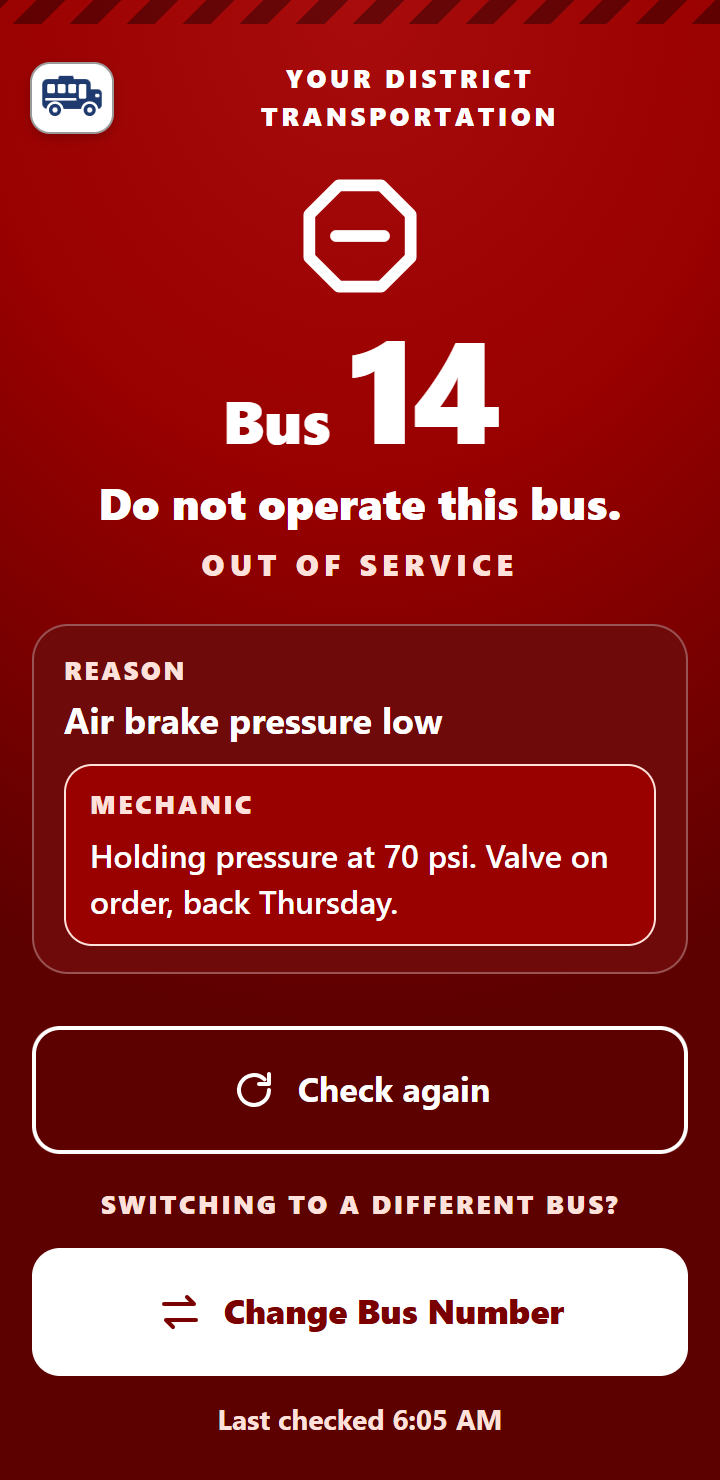
Mark a bus Out of Service in the mechanic app. When the phone of a driver on that bus checks in with the office (it needs signal), it shows a full red screen: Do not operate this bus, with the reason and the shop's note. When the repair is done and the bus is cleared, the warning clears too.
The phone hears about an Out of Service bus only when it has signal. Once it has heard, it keeps showing the warning, even with no signal, until the office says the bus is cleared. A phone that has had no signal since before the bus was pulled can't know, so for a bus that's truly down, keep tagging and parking it as you do today.
Phones and tablets
Drivers can use the phone they already carry. For a driver who doesn't have one, we provide a tablet for $8 a month.
The driver with a phone
$0The phone already in their pocket. No special hardware, and nothing to charge in the bus.
The driver without a phone
$8/moA tablet we provide, for the driver who doesn't carry a phone. Ask Bob for the tablet terms.
The rules we built to
Every report carries the driver's PIN signature and the office's own clock time, and every driver signs an electronic signature agreement before their first inspection. Here's what it's built to, named in full.
Anyone who must sign an FMCSA document may sign electronically, using any available technology.
What a driver vehicle inspection report covers, and that the driver signs it.
Before driving, the driver makes sure the bus is safe and reviews the last report's defects.
Published Feb 19, effective March 23, 2026: these reports may be created and kept electronically.
For Washington buses, drivers certify the checks in the state's pre-trip and post-trip rule, WAC 392-145-041. Washington's Uniform Electronic Transactions Act and the federal ESIGN Act both recognize electronic signatures.
Add-on
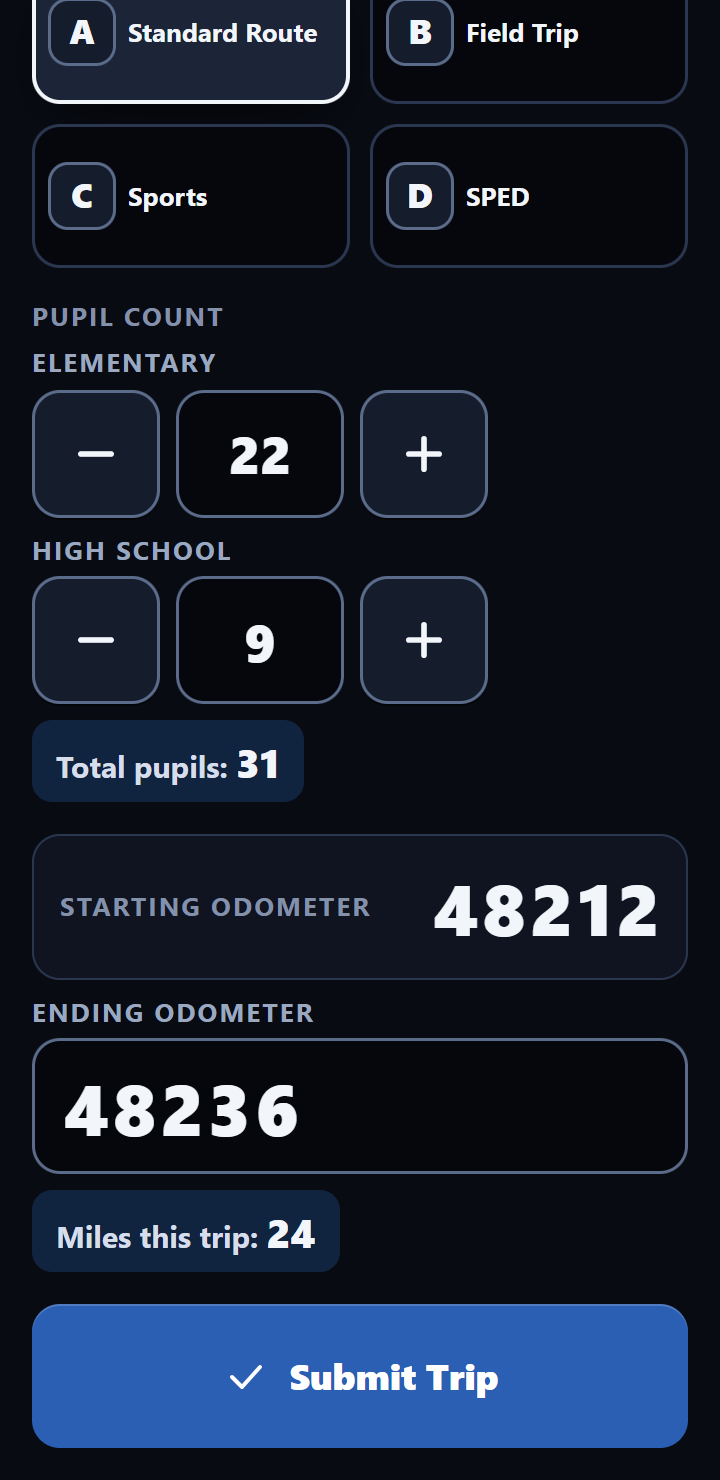
With the Mileage & Pupil Tracker, drivers log each route or trip in a few taps: trip type, pupil counts and the ending odometer. The starting reading carries over from the last trip.
Pricing
Pay for your driver seats, not for every bus in the lot. A seat is anyone with a driver PIN. Spare buses, mechanics and supervisors cost nothing extra.
One-Touch DVIR
Everything on this page: the driver app, the mechanic app, defect alerts by text and email, Out of Service warnings and the monthly report.
Getting started
Tell us about your garage: how many buses and drivers, and who fixes them. No pitch, just a conversation.
Driver names and bus numbers on a one-page setup sheet, plus who should get defect alerts.
Your district's own system: driver PINs, text and email alerts, monthly reports, and your name and logo on the app.
A QR poster goes up in the drivers' room. Scan it, add the app to the home screen, and sign once with a PIN.
In service
Okanogan School District
Larry Scroggins wrote down what he needed from a digital DVIR: one touch, reports he didn't have to build, and a mechanic who hears about defects right away. Here's what he got.
Read Okanogan's storyIf you need these, you need a bigger system, and we'll tell you so. That's why this one stays simple and priced for a small garage.
Before you call
Federal rules let anyone who must sign an FMCSA document sign electronically, “using any available technology” (49 CFR § 390.32), and inspection reports under 49 CFR §§ 396.11 and 396.13 may be kept electronically under that rule, as FMCSA's eDVIR final rule spelled out (effective March 23, 2026). The federal ESIGN Act and Washington's Uniform Electronic Transactions Act both say a signature can't be denied legal effect just because it's electronic. Your driver's assigned PIN serves as their electronic signature on that basis.
Each driver reads a written electronic signature agreement and signs it with their PIN the first time they sign in, and again after a bus change. After that, each inspection the driver sends is signed with their supervisor-assigned PIN on file.
The driver finishes the inspection anyway. It saves on the phone and sends itself as soon as the phone has signal again while the app is open, or the next time the app is opened. Each record has its own ID, so it can never be counted twice.
Your district does. That's written into the agreement. The records are kept on Google, in an account we manage, in a setup of your garage's own. Your supervisor has live access to every record, you get a full PDF every month, and a complete copy of your records whenever you ask, at no charge.
No. Drivers can use the phone they already carry. For a driver who doesn't carry one, we provide a tablet for $8 a month. Ask Bob for the tablet terms.
$20 per driver seat per month, with a 5-seat minimum ($100 a month). Buses, mechanics and supervisors are free. The Mileage & Pupil Tracker is $10 per driver per month if you want it.
It's a one-year agreement that renews automatically each year unless either side gives 60 days' notice. Either side can end it for any reason with 90 days' notice, and a public agency can leave at the end of its fiscal year, with no penalty, if the money isn't appropriated. See pricing and terms.
I drive a bus for Okanogan School District. One day my supervisor was complaining about the DVIR app we paid for. It cost too much, it was too hard for drivers to click through, and he still had to put the reports together himself at the end of every month. I said, “Certainly there's got to be a solution out there already.” He said, “Unbelievably, there isn't.”
So I started researching. Most offerings came packaged with commercial systems costing thousands of dollars, and most apps built for trucking had steep learning curves and long setup. None of it was built with rural bus garages in mind. So I built it from the ground up.
The drivers here really like it. We'll keep improving it, adding features and keeping the price low, so rural bus garages can have this kind of tool without paying commercial fleet prices.
There's no support ticket between you and a real answer. You reach the person who built it. Email is fastest, and I return calls the same day.
Fair question to ask any vendor: what happens to your records if something happens to us? They're your district's by contract. Your supervisor can open them any time, and every month's PDF is already in your inbox. If the agreement is ever passed to a new owner, they have to take on our obligations in writing, and you're told within 30 days. And if the agreement ends for any reason, you have 30 days to take a complete copy, at no charge. More on that.
A real answer from the person who built it. Tell us how many buses and drivers you run, and what you use today.
Serving Washington school bus garages. Calls returned the same day.