Questions and answers
Straight answers, limits included.
What supervisors, mechanics, business offices and drivers ask us before they switch, answered in plain English. Where something has a limit, it's written here, so you know before you sign, not after.
Shown with made-up demo data
The short answers
for a clean inspection, signed with the driver's PIN on file.
per driver seat per month. Buses, mechanics and supervisors are included.
a month for a tablet, for the driver who doesn't carry a phone.
to fill in the one-page setup sheet. Plan on a week or two to go live.
Didn't see your question?
Ask Bob. You'll get an answer from the person who built it.
The basics
What it is, who it's for, and what your drivers will actually see.
What is One-Touch DVIR?
It puts your drivers' pre-trip and post-trip inspections on their phones. A clean bus takes one tap. A defect reaches your mechanic by text and email within seconds. And on the 1st of every month, your supervisor gets one PDF with every bus's inspections, defects and repairs.
There are three parts: the driver app, the mechanic app and the monthly report. The optional Mileage & Pupil Tracker adds route and trip logging for your business office.
Who is it for?
Washington school bus garages: school districts, educational service districts (ESDs) and private contractors that run school routes. It was built for rural and midsize garages, where one supervisor and a mechanic or two keep the whole fleet on the road.
Outside Washington? Call Bob first. Today's agreement is written for Washington garages.
How long does a clean inspection take?
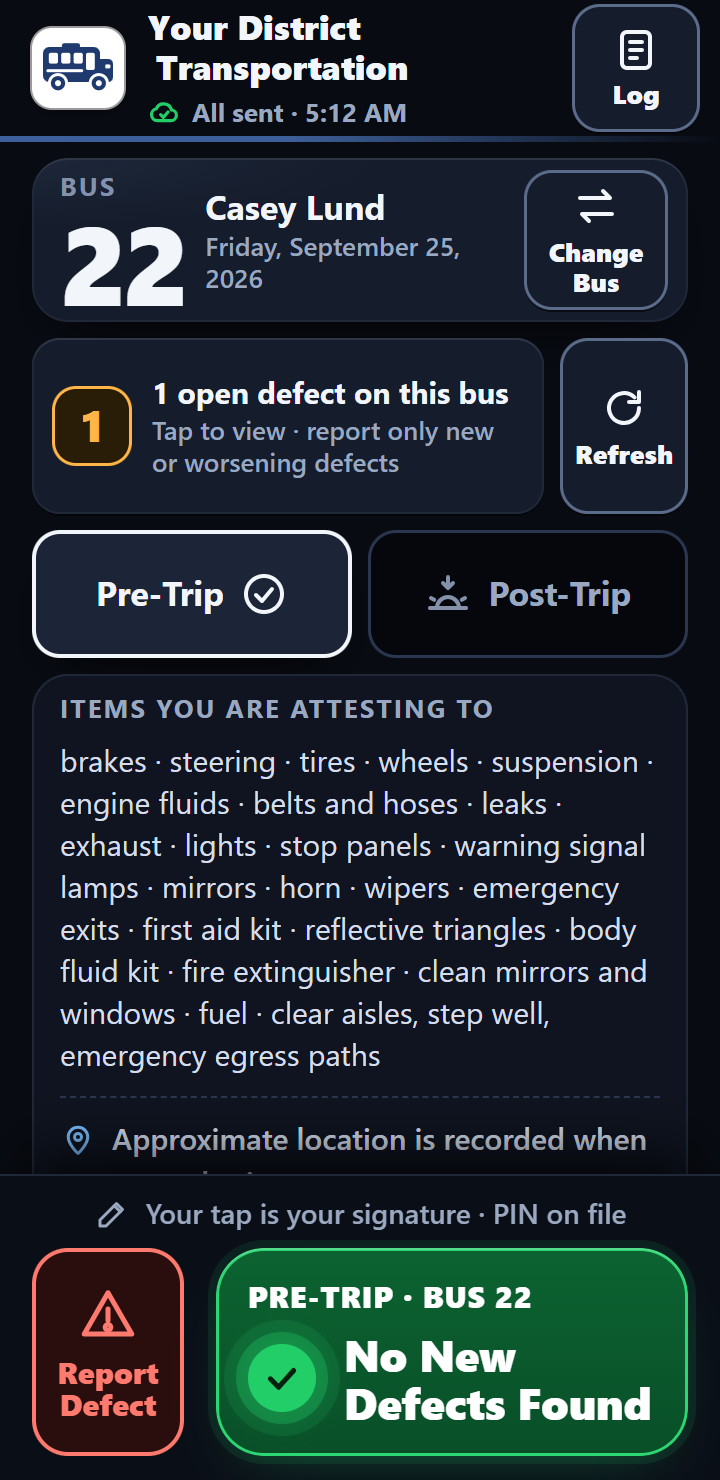
The walk-around takes as long as it always has. Recording it takes one tap. The driver taps No New Defects Found, and the inspection is signed with their PIN on file and sent to the office in a few seconds.
The driver enters their PIN when they first sign on, and again when they change buses. After that, a clean inspection is one tap.
What does the driver see?
Their bus number, whether it's the pre-trip or the post-trip (the app picks it from the day's log), and one big green button: No New Defects Found. Above it, a line reads “Your tap is your signature · PIN on file,” and the 23 items they certify are listed on the screen. When the phone has signal, a bar also shows any open defects on the bus and where each repair stands, so nobody reports the same problem twice.
Found a problem? The driver picks it from a list of categories, like brakes, tires, lights and emergency exits, adds a note and sends it. If the shop has marked the bus Out of Service, the phone shows a full red Do not operate this bus screen once it has heard that from the office, and it remembers, so the warning still shows later with no signal. A phone that hasn't reached the office since the bus was pulled can't know yet.
Shown with made-up demo data
What doesn't it do?
On purpose, it doesn't track buses or drivers with GPS, doesn't use cameras, doesn't do routing or a parent app, and doesn't put AI in your inspections. If you need those, you need a bigger system, and we'll tell you so.
Two more honest limits. A driver describes a defect by picking it from the list and adding a note; there's no photo attachment. And an inspection saved without signal sends while the app is open, not in the background.
Drivers and phones
Phones and tablets, gloves and dark yards, dead zones, and what it means for a driver's privacy.
Do drivers use their own phones?
They can: drivers can use the phone they already carry. For a driver who doesn't carry one, we provide a tablet for $8 a month, set up for that one driver.
Whether drivers use personal phones is your district's call. The app works on iPhone, Android and tablets, with no special hardware required.
How do drivers get the app?
There's no app store. Your garage gets a QR poster for the drivers' room. A driver scans it or opens the link, adds the app to the home screen, enters the PIN the supervisor gave them and their bus number, and signs the driver electronic signature agreement. It takes about a minute.
Our drivers aren't tech people. Will they manage?
That's who it was built for. No password to remember, no account to create and no menus to learn: a four-digit PIN from the supervisor and one green button.
Larry Scroggins, Transportation Supervisor, Okanogan School District, where Bob drives a bus, put it this way: “Drivers picked it up on day one — adoption has been the easiest part.”
What about gloves, cold hands and a dark yard?
The buttons are big and easy to hit with cold hands or touchscreen gloves. A dim night screen won't blind a driver in a dark yard at 5:30 AM, and a crisp day screen stays readable in snow glare.
What if our bus yard has no signal?
The driver finishes the inspection anyway. It's saved on the phone and sends itself as soon as there's signal while the app is open, or the next time the app is opened. The driver's history shows which inspections are sent and which are still waiting.
Every inspection carries its own ID, so the office ignores a repeat send of one it already has. One honest limit: a closed app doesn't send in the background. The same goes the other way: what the driver sees from the office, like open defects on the bus, the mechanic's notes and the Out of Service warning, arrives only when the phone has signal. Once a phone has heard that a bus is Out of Service, it remembers and shows the warning even with no signal. A phone that hasn't reached the office since the bus was pulled can't know yet. We'd rather you know exactly how it behaves before you sign, not after.
Is the app tracking our drivers?
No. The app records one approximate location with each inspection it sends: the spot the phone reports, and how accurate the phone says that is. It doesn't run in the background, doesn't follow a route, and trip logs carry no location at all.
If the phone can't get a location, the inspection sends anyway with that part blank. It's disclosed in the driver electronic signature agreement, and the main screen says so too: “Approximate location is recorded when you submit.”
What about phones and driving?
The inspection is never done while driving. The pre-trip happens parked, before the route, and the post-trip happens parked, at the end of it. Nothing is mounted in the bus, and there's nothing in the app to do while the bus is moving.
What does it put on a driver's personal phone?
Very little. The app is a web page saved to the home screen, not a store download. It keeps the driver's name, PIN and bus number, their own recent inspections, and anything still waiting to send. It never reads contacts, photos or messages, and the app doesn't ask for a driver's phone number or email.
Clearing the browser's data removes all of it. And if a driver would rather not use a personal phone, that's what the $8 tablet is for.
Signatures, records and the law
Built to FMCSA's electronic DVIR rules, named in full: 49 CFR §§ 390.32, 396.11 and 396.13, as amended by the eDVIR final rule (91 FR 7893, published Feb. 19, 2026, effective March 23, 2026).
Is a four-digit PIN really a legal signature?
Federal rules let anyone who must sign an FMCSA document sign electronically, “using any available technology” (49 CFR § 390.32). Driver vehicle inspection reports under 49 CFR §§ 396.11 and 396.13 may be created and kept electronically under that rule, as FMCSA's electronic DVIR final rule spelled out, effective March 23, 2026. Federal and Washington electronic-signature laws also recognize electronic signatures: under the ESIGN Act and Washington's Uniform Electronic Transactions Act, a signature can't be denied legal effect just because it's electronic.
Here's how it works. The supervisor assigns each driver a PIN. The first time a driver signs on, they read the driver electronic signature agreement and sign it with that PIN. They sign it again with the PIN when they change buses. After that, each inspection they send is signed with the PIN on file, and the screen says so right above the button: “Your tap is your signature · PIN on file.” Read the full compliance detail.
Does the federal DVIR rule even apply to a school district?
Honest answer: it depends on who runs your buses and what trips they run. Federal rule 49 CFR § 390.3T(f) takes home-to-school bus operations, and transportation run by a state or a local government, out from under most federal motor carrier safety rules, the DVIR rules included. Private contractors, and trips other than home-to-school, can be a different story. Your own counsel can tell you where your operation falls.
In Washington, every school bus driver works under WAC 392-145-041, the state's pre-trip and post-trip checklist, including the end-of-route check that no child is left on the bus. One-Touch DVIR is built to FMCSA's electronic DVIR rules (49 CFR §§ 390.32, 396.11 and 396.13) either way, and the signature agreement each driver signs cites the Washington rule.
Is paper still legal?
Yes. FMCSA's 2026 rule didn't make anyone go electronic. It put in writing that inspection reports may be electronic, and paper stays allowed. What paper can't do is text your mechanic, show the next driver that a bus is Out of Service, or build your monthly report.
One more difference. The federal rule only asks for a written report when a driver finds a defect. One-Touch DVIR also keeps a signed record of every clean inspection, so you can show who signed for each pre-trip, and when.
What does each inspection record hold?
Every inspection, clean or not, is saved with the office's own time stamp, the driver's name and PIN signature, the bus number, pre-trip or post-trip, the result (No New Defects Found, or the defects and the driver's note), the approximate location when the phone provides one, and the type of phone and browser that sent it.
A defect then carries the shop's side: the repair status, the mechanic's notes, the action date, and whether the driver tapped Got It on the mechanic's message. Each driver's signed agreement is kept separately, with its version and time.
How long do we have to keep inspection records?
Where the federal DVIR rules (49 CFR §§ 390.32, 396.11 and 396.13) apply, § 396.11 asks you to keep the report, the repair certification and the driver's review for three months. Washington public districts also follow the state's records retention schedules, which can ask for longer. Your records officer sets the schedule; the agreement leaves that decision with your district.
One-Touch DVIR keeps every inspection for as long as your subscription runs and never deletes one on its own. The agreement makes your district the official keeper of its records, though, so file the monthly PDFs, or a complete copy, with your own records for as long as your schedule asks.
Who owns our inspection records?
Your district owns every record. It's written into the agreement. Your records live on Google, in an account we manage, in a setup of your garage's own: your own spreadsheet and your own app addresses, with no database shared with any other garage.
Your supervisor can open the records any time, the monthly PDF lands in your inbox on the 1st, and you can ask for a complete copy of your records whenever you like, at no charge. The outside companies that help us run the service, including the AI assistants we use for support, are named on the privacy page. More on security and data.
What happens to our records if something happens to Bob or the company?
It's a fair question to ask any vendor. Your records are yours by contract. Your supervisor can open them any time, and every month's PDF is already sitting in your inbox. If the agreement is ever passed to a new owner, it requires them to take on our obligations in writing, and you're told within 30 days. If the agreement ends, for any reason, you have 30 days afterward to take a complete copy, at no charge. We delete your records from the service within 60 days of the end date (sooner if you confirm you have your copy), and backups within 90.
FMCSA does not certify or approve DVIR software. Your district remains responsible for its own compliance. Nothing on this site is legal advice. See the rules we built to.
Mechanics and supervisors
Alerts, quiet hours, Out of Service, and the report that arrives on the 1st.
How do defect alerts work?
The moment a driver sends a defect, your mechanic and supervisor hear about it within seconds: which bus and what's wrong by text, plus the driver's own note and, when the phone gave a location, a map link by email. You choose who on your team gets them, and you can change that any time. Bob also gets a copy of each defect text.
The defect also lands on the mechanic app's list of open defects, where the shop moves it through five statuses: New, In Progress, Parts Ordered, Out of Service and Clear.
Can we stop the texts at night?
Yes. Turn on quiet hours for each person who wants them, and their driver defect texts stay quiet overnight, in the window you pick. The email still goes out right away.
What happens when the shop marks a bus Out of Service?
The mechanic marks it in the mechanic app. As soon as a driver's phone checks in with the office, a driver on that bus gets a full red screen, Do not operate this bus, with the reason and the shop's note. When the repair is done and the bus is cleared, the warning clears too.
The honest limit: a phone learns a bus is Out of Service when it reaches the office, which happens when the driver opens the app, comes back to it, picks a bus, or gets signal back. Once it knows, it remembers, so the warning still shows in a yard with no signal. A phone that hasn't reached the office since the bus was pulled can't know yet. So for a bus that's truly down, keep your usual shop practice too: tag it, park it and tell the driver.
What's in the monthly report?
On the 1st of each month, your supervisor gets one PDF with every bus in it: a cover page and index, then each bus's inspections for the month, the defects reported, what happened to each one, anything still open at month's end, and which drivers inspected it. Print it, file it, done.
A PDF for each bus is also saved to Google Drive. Need another month, or one bus for an auditor or your board? It can be run again on request.
How do we add drivers and buses?
From the Drivers and Buses pages in the mechanic app, signed in as a supervisor. Add a driver and give them a PIN, change a PIN, or take a driver off the list. Add a bus, or retire one.
A new driver with a PIN is a new driver seat, and seats can be added any time. See pricing.
How many mechanics and supervisors can we have?
As many as you need. Mechanics and supervisors are included at no charge, and so is every bus. The price follows your driver seats: one for each person with a driver PIN.
Pricing and the agreement
One price per driver seat, and the other things a business office asks. All prices are plus applicable Washington sales tax.
How is it priced?
$20 per driver seat per month. A driver seat is anyone with a driver PIN. Buses, mechanics and supervisors are included, and so are setup, training and support. There's no setup fee.
A 12-driver garage, for example, is $240 a month. Pay for the year up front and save 10%. Price your garage.
What is the Founders' rate?
$20 per driver seat per month with the Mileage & Pupil Tracker included, and it stays that way for as long as your agreement continues. A 10-driver garage, for example, is $200 a month with the Tracker included, or $2,160 for the year paid up front.
Spots are limited. Ask Bob whether a Founders' spot is open for your garage.
Do substitute drivers count?
A seat is anyone with their own driver PIN, so a sub who has a PIN takes a seat. Your seat count is set in your agreement, so it doesn't swing up and down with who drove that month. Seats can be added any time and trimmed at renewal. Talk it through with Bob before you pick a number, because how your garage uses subs makes a difference.
Do spare buses cost extra?
No. Every bus is included, spares and all. You pay per driver seat, not for the buses in the lot.
Is there a minimum?
Yes: five driver seats, which is $100 a month. A garage with fewer than five drivers pays the $100 minimum. With the Mileage & Pupil Tracker added at the Standard rate, it's $150 a month.
What does the Mileage & Pupil Tracker cost?
$10 per driver per month at the Standard rate, on top of the $20 base price. It adds route and trip logging with pupil counts and odometer readings, and a monthly mileage and ridership report for your business office. Pupil counts only, never student names.
Paying for the year up front? The 10% comes off the Tracker too. See the tracker.
What does a tablet cost?
$8 a month per tablet. Drivers can use the phone they already carry; a tablet is for a driver who doesn't carry one.
Each tablet is set up for one driver, who signs with their own PIN, the same as on a phone. Ask Bob for the tablet terms.
What are the agreement terms?
It's a one-year agreement that renews each year unless either side gives 60 days' notice. Either side can end it for any reason with 90 days' notice. And if you're a public agency and the money isn't appropriated, you can leave at the end of your fiscal year, with 30 days' notice and no penalty.
Ask Bob for the full agreement. Your business office should read it before you decide.
Is sales tax included?
No. Prices are plus applicable Washington sales tax.
How can our business office pay?
By check, ACH transfer, or a warrant backed by a purchase order. Invoices are due in 30 days. You can be billed monthly in advance, or once a year up front, which takes 10% off driver seats and the Tracker. Tablets aren't discounted.
Is there a free trial?
There isn't a free trial. Instead, Bob will show you the whole thing working, the driver app, the mechanic app and a sample monthly report, and answer every question before you sign anything. Call or email to set it up.
Getting started
Plan on a week or two to go live. Here's what that takes from you.
How long until we're up and running?
Plan on a week or two from signing to go-live. We build your garage's setup the same day we get your setup sheet. The rest of the time goes to testing it with you and getting your drivers signed on.
What do you need from us?
About ten minutes: your driver names and bus numbers on a one-page setup sheet, plus who should get defect alerts. Send your district's logo if you'd like it on the app. With the Mileage & Pupil Tracker, we'll also need each bus's current odometer reading. We handle the rest.
Is training included?
Yes. Setup, training and support are included in the price. We train your supervisor and mechanic on their side of it and help get your drivers started. Drivers get a QR poster and a short guide; signing on takes about a minute, and after that it's one green button.
A good way to start: have two or three drivers use it alongside paper for a day, then move everyone over.
Does our IT department need to do anything?
Usually nothing. There's no app store, no device management, no accounts on your network and nothing to install on district computers. No district network is needed.
If your district filters its own devices, IT may need to allow the two app addresses. Want the details for your IT team? See security and data.
Who do we call when something goes wrong?
Bob. There's no ticket system between you and the person who built it. At 5:30 a.m. nothing waits on us: if our end is down, the inspection still saves on the phone and sends later. For anything else, call or email Bob. Outage response is within four business hours, weekdays 8 to 5 Pacific.
Didn't see your question?
Ask Bob. You'll get a straight answer from the person who built it, and your question may end up on this page.
Serving Washington school bus garages: districts, ESDs and contractors. Calls returned the same day.